A binder for production documents and floor plans

From scout to shoot day, one binder.

The PDFs your production sends, floor plans drawn with stamps, scout photos and notes. Put the documents that usually end up scattered into one binder, and link them with Pins.

Download on the App Store Free for your first project. For iPad and iPhone (iPadOS / iOS 17 or later)

Built by a working gaffer, on real scouts and shoot days.

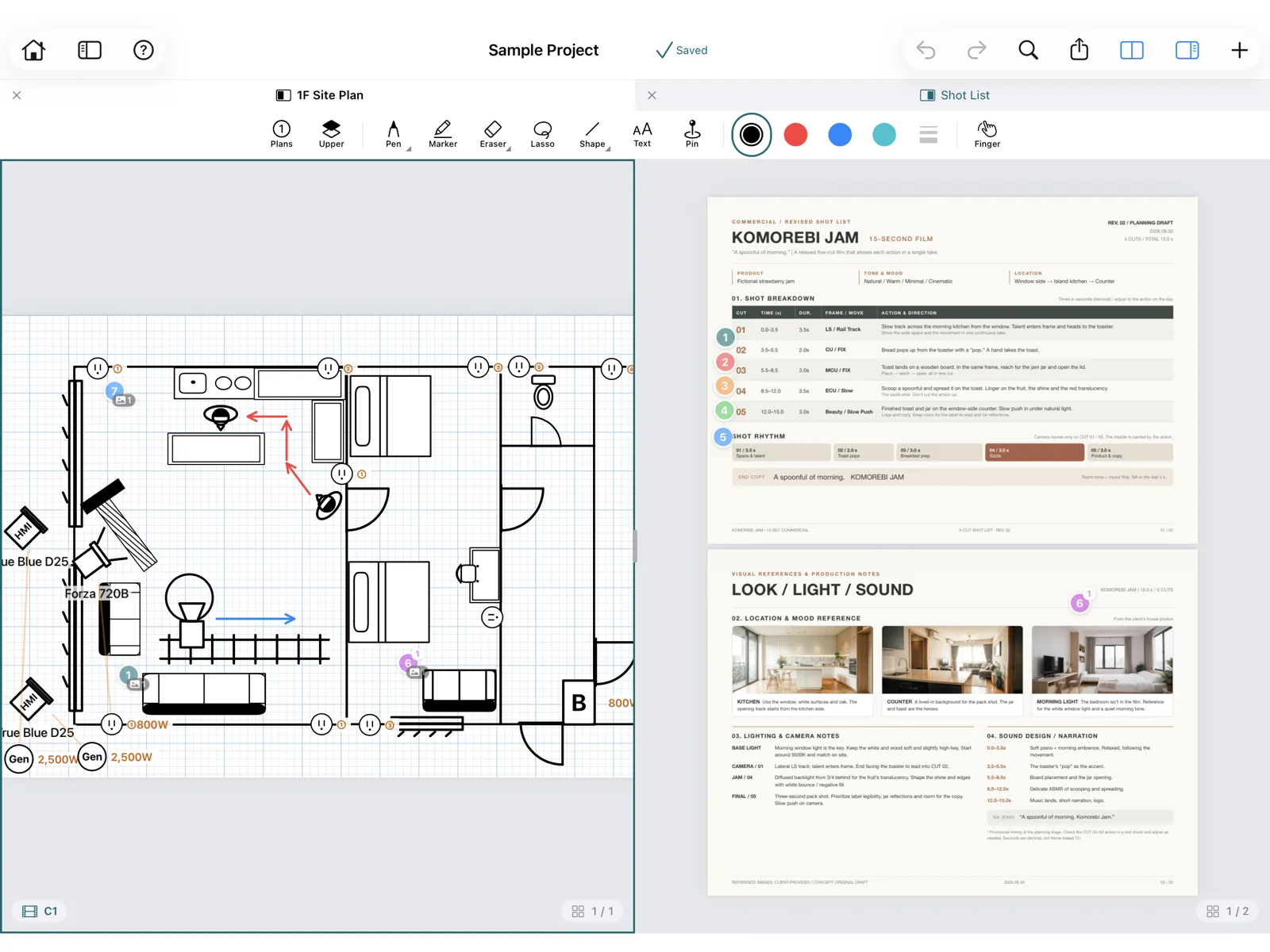
iPad in split view: a floor plan with cameras and lights next to a shot list PDF.

Finding documents and drawing plans takes too long.

  • Documents and notes are everywhereScripts in a shared folder, plans in email, scout photos in the Photos app, notes on paper. You end up searching on set.
  • Floor plans take time to drawIn Illustrator or a spreadsheet, you start by drawing the gear symbols yourself.
  • Every revision means copying notes againWhen a new version arrives, the notes and positions on the old one have to be redone by hand.

With ShootBinder, documents, plans and photos live in one binder, linked together.

Collect. Draw. Connect.

Import scripts and shot lists as the PDFs you already receive. No need to rebuild them in a special format.

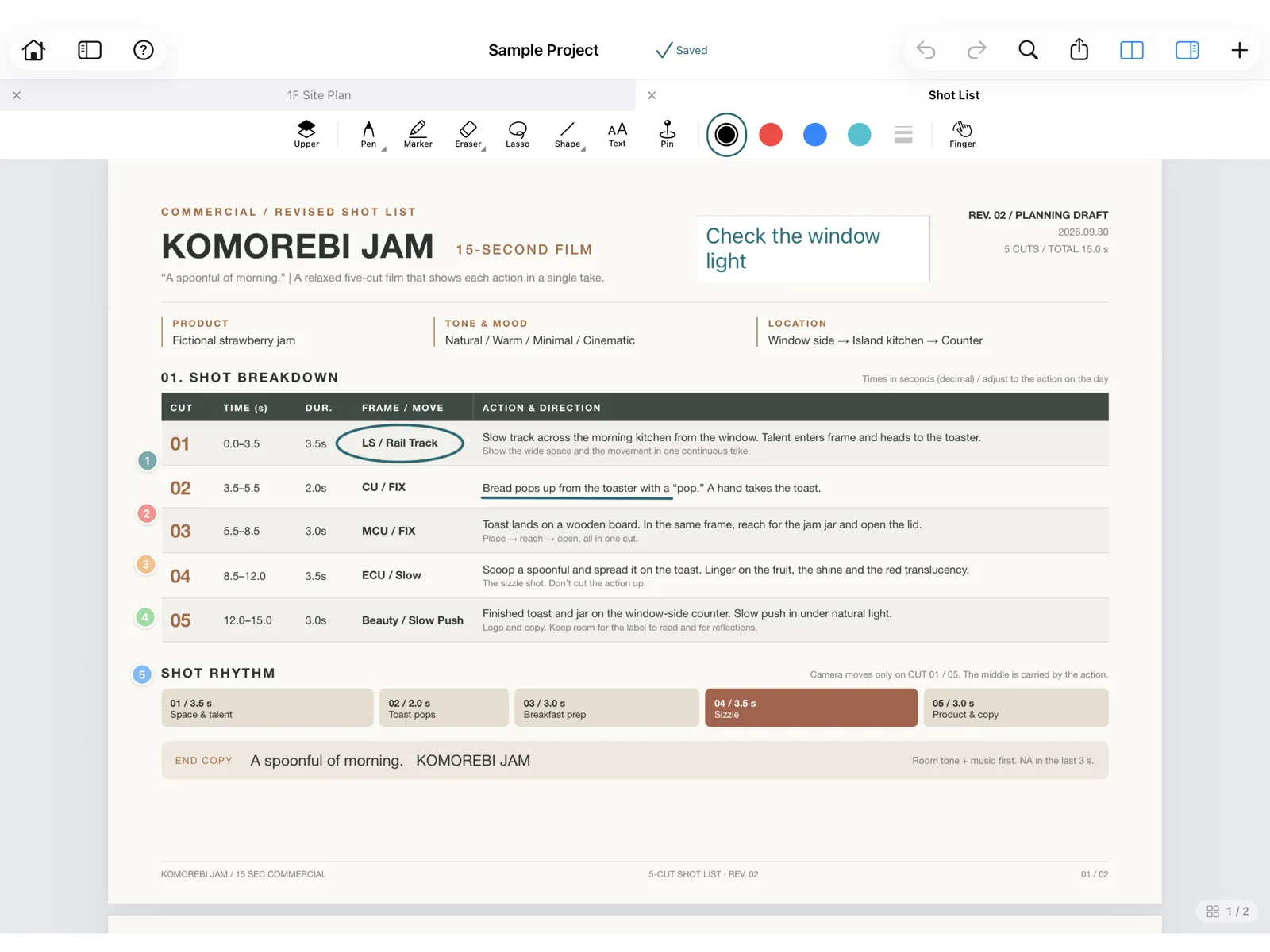
iPad screen with handwritten notes on a shot list PDF.
01

Scripts, schedules and shot lists in one binder

Import scripts, schedules, shot lists and floor plans as PDFs. Organize them by project and folder, and keep every document for the shoot in one place.

  • Write right on the page with Apple Pencil
  • View two documents side by side (iPad)
  • Put a revision next to the old version and drag your notes and items across
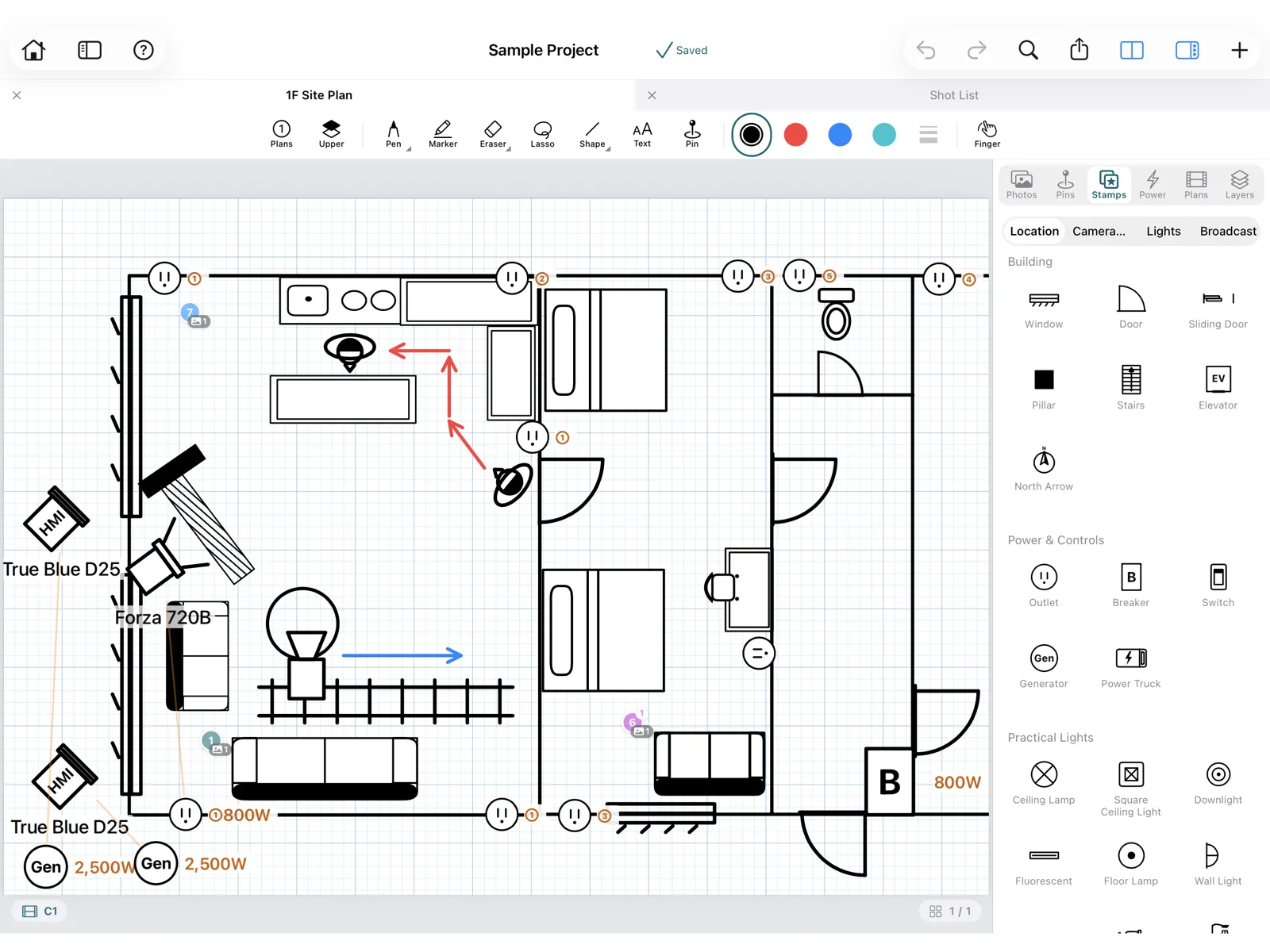
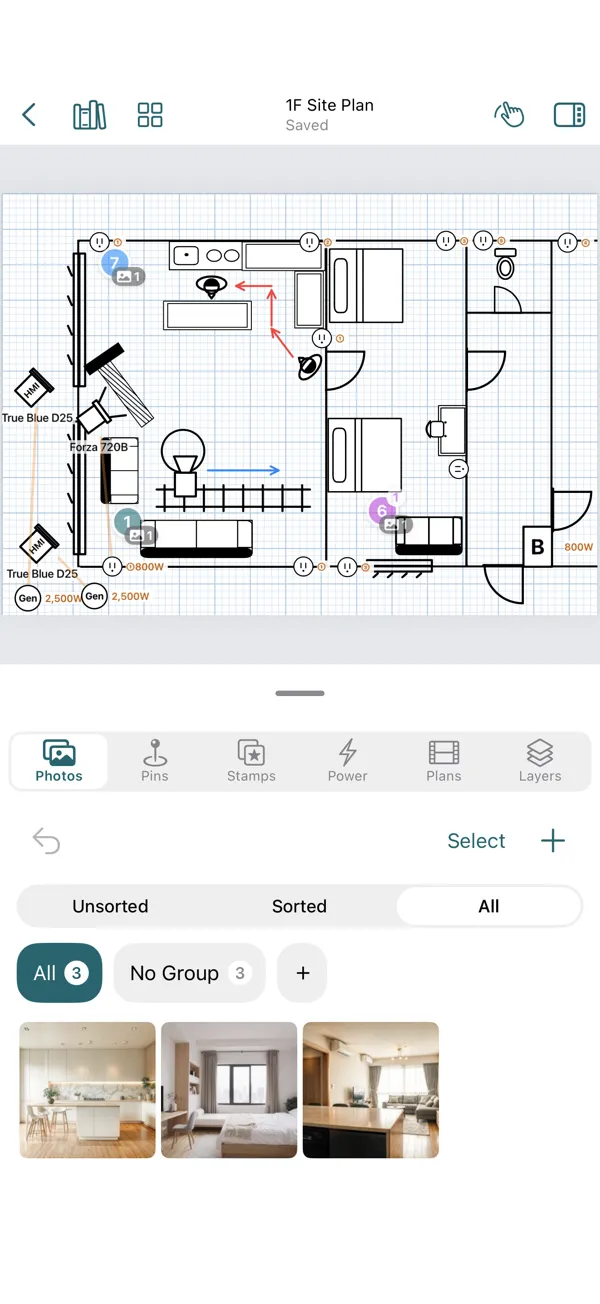
A floor plan drawn on a grid page with stamps for windows, doors, outlets, cameras and people.
02

Floor plans and lighting setups, drawn fast with stamps

Place the symbols you use on set as stamps: cameras, people, lights, stands, windows, doors, outlets and more. Lines, rectangles, circles, arrows, dimension lines and grid pages make the room quick to draw. The lighting setup and the camera and talent positions go on the same plan.

  • Draw lighting plots with stamps for lights, stands, flags and diffusion
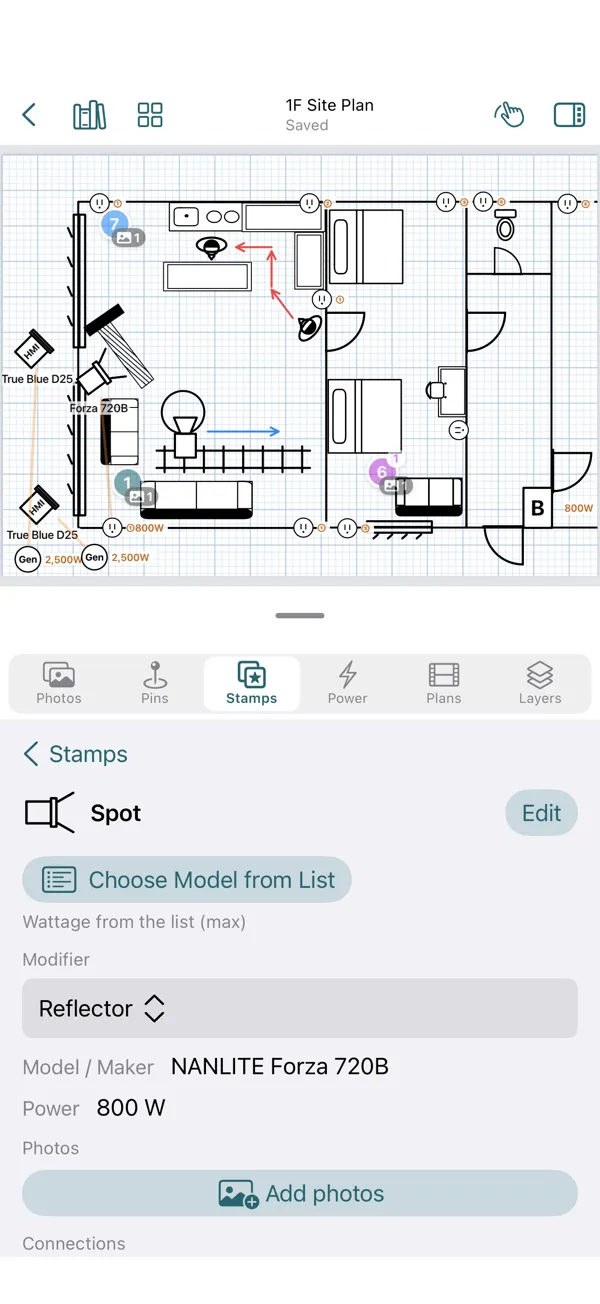
  • Choose a fixture to fill in its model name and wattage
  • Attach gear details, notes and photos to any stamp
  • Add lengths with dimension lines
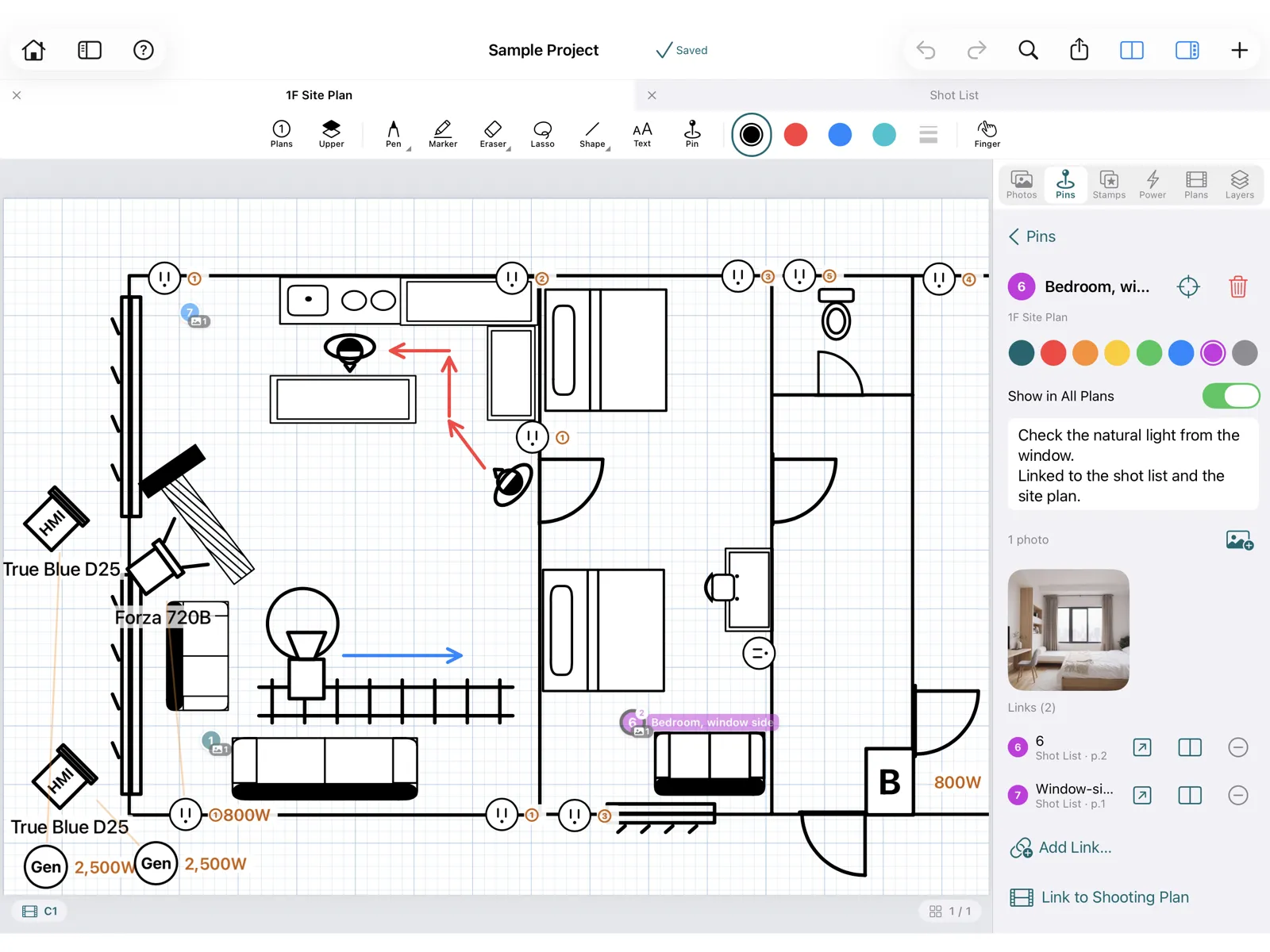
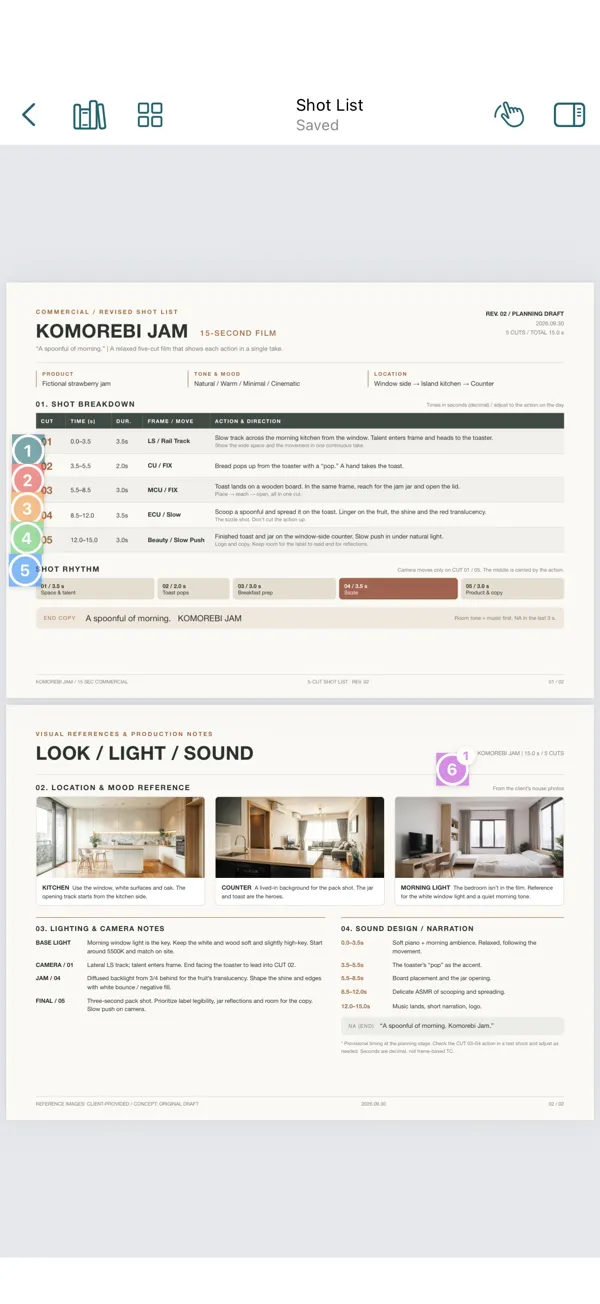
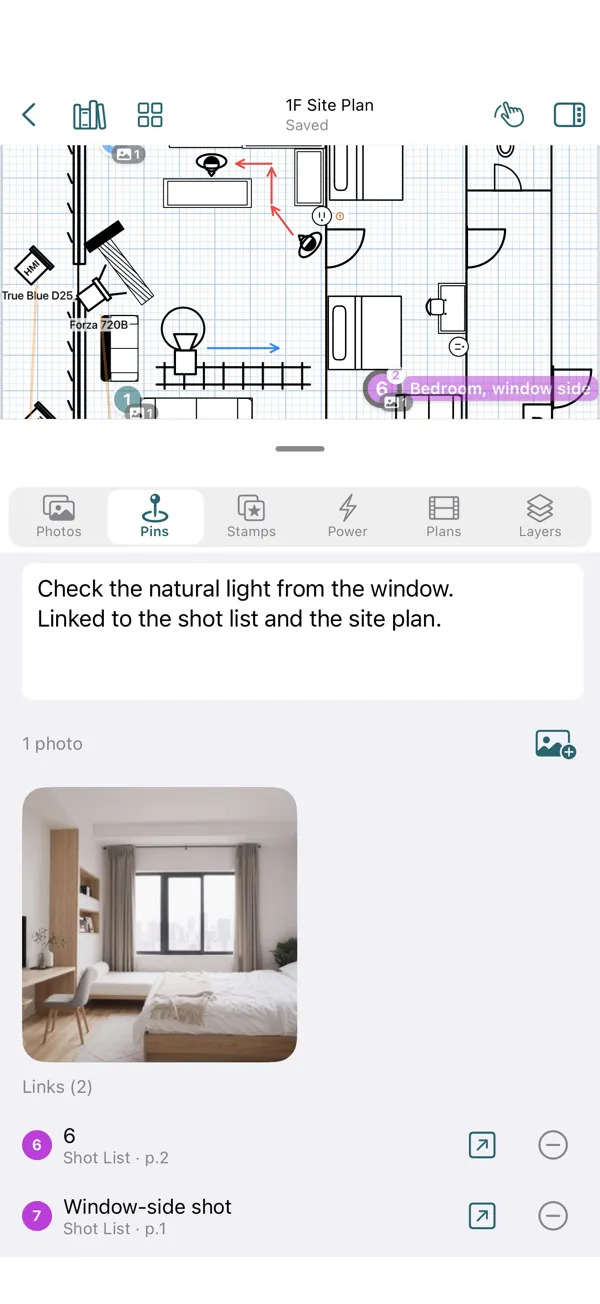
A Pin on the floor plan linked to a Pin on the shot list, with the Pin's notes, photos and links shown.
03

Connect plans, documents and photos with Pins

Drop Pins on a floor plan or shot list and attach scout photos and notes. Link Pins to each other to jump from a spot on the plan to the matching shot, and from the shot to the scout photos.

  • Several photos and notes on one Pin
  • Open the linked document in split view

From prep to checking on set

Organize scout photos, check where the sun will be, plan lighting power and share with your crew.

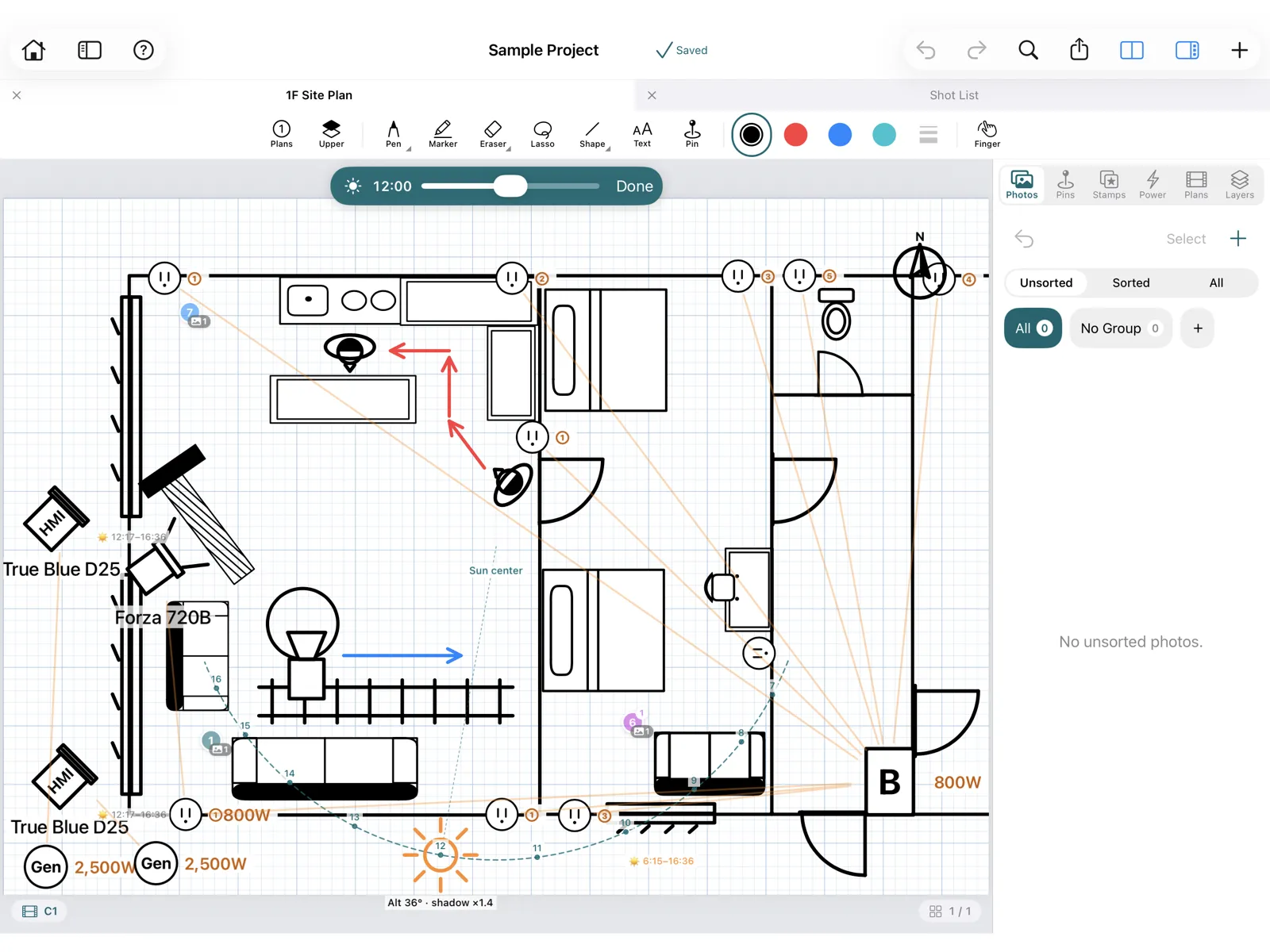
The day's sun path and times drawn over the floor plan.

The sun's path, on your plan

Set the location on the compass stamp and the shoot date on the sun stamp to see that day's sun path and times on the plan, plus an estimate of when sun comes through the windows.

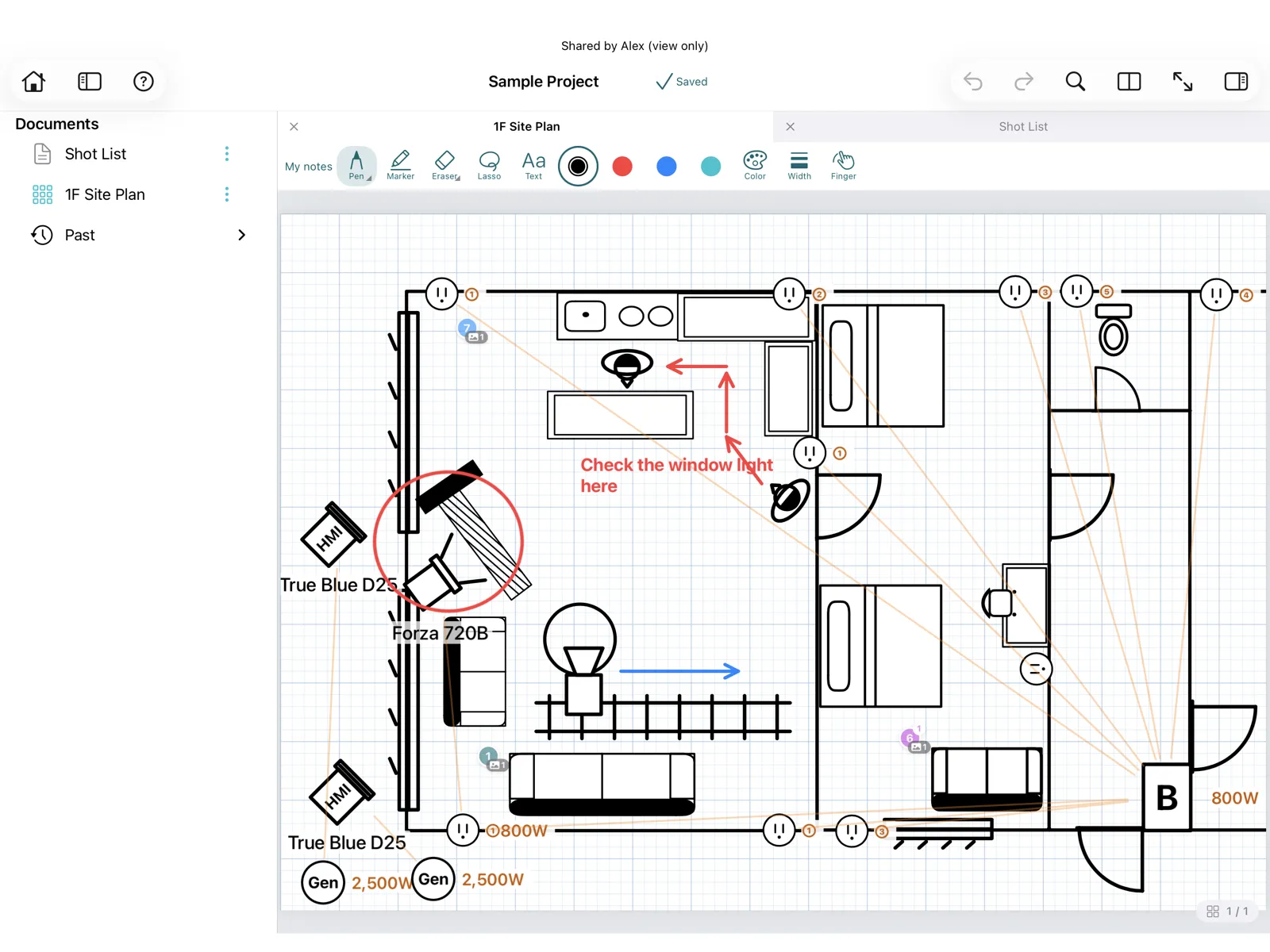
A shared floor plan with private notes written on top.

Share with your crew. Everyone adds their own notes

Share a project view-only. Recipients open it for free and can write "My notes" in handwriting or text. Their notes are shown only to them and never change the original. Starting a share is a ShootBinder Pro feature.

Switch between shooting plans

Keep the room as it is and check the camera, talent and lighting positions for each setup. Pins on the shot list can be linked to a plan.

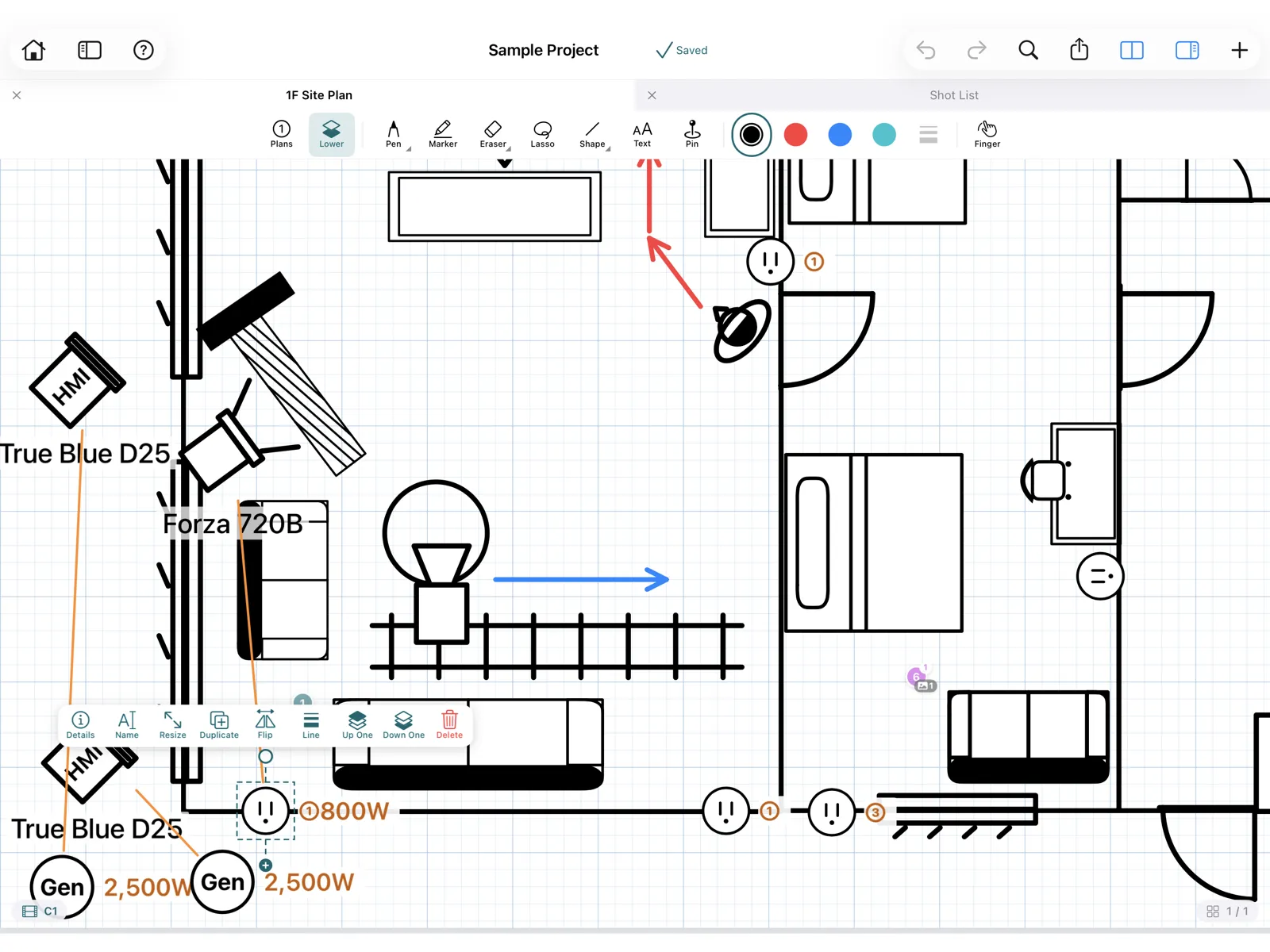
Lights connected to outlets with the total wattage shown.

Estimate lighting power

Draw a line from each light to an outlet or breaker panel to total the wattage you entered. Use it as a planning estimate; it does not guarantee electrical safety.

Full screen, documents only

In meetings and on set, hide everything else and show just the documents, even in split view, without accidental marks.

Export to PDF for the crew

Export documents with their photos and notes as a PDF for crew who don't use ShootBinder, or send a project or document as a file to those who do.

Sync your own iPad and iPhone

Projects sync over iCloud between devices signed in to the same Apple Account. Documents stored on the device open without a signal.

Sync stops if your iCloud storage is full.

On set, check it on the iPhone in your pocket

Read documents, shoot and organize scout photos, and check Pins and stamps on iPhone too.

A shot list PDF on iPhone.
Your documents, in handCheck scripts, shot lists and plans on set.
Scout photos organized into groups on iPhone.
Scout photos, inside the projectOrganize what you shoot, and attach it to plans and Pins.
A Pin's details on iPhone.
Photos and notes, from a PinJump straight to the linked shot list.
Details of a light placed on the plan, on iPhone.
Gear details, right thereSee the fixture and modifiers of each light on the plan.

For example, on a scout day

How the gaffer who makes ShootBinder uses it on real scouts.

  1. Draw the plan on iPad, on the spotDuring the scout, sketch the floor plan on iPad, placing windows, doors and outlets as stamps.
  2. Shoot photos on iPhoneJust take scout photos on your iPhone. They go straight into the project's Photo Box.
  3. Organize on the ride backWith iCloud sync on, the photos arrive on your iPad. On the way back, drag them onto the plan and Pins.

Sync and sharing use your iCloud

ShootBinder syncs your devices and shares projects through your own iCloud, not the developer's servers. Please check your iCloud storage before you start.

Synced projects use iCloud storage

Documents and photos in projects with sync on are stored in your iCloud. Projects with many photos use more space. Projects without sync stay on the device only.

Sync stops when storage is full

If your iCloud storage runs out, sync to your other devices stops. Your data on this device stays usable, and unsent changes are kept and sent once space is available.

Sharing uses the owner's iCloud

A shared project uses the owner's iCloud storage, not the recipients'. If the owner's storage is full, updates stop reaching recipients. The contents are downloaded to each recipient's device.

FAQ

Who is ShootBinder for?

Film, TV, commercial and music video crews who carry documents and floor plans on location scouts and shoot days: lighting, camera, directing, production and art departments. It was built by a working gaffer.

Can I draw a lighting plot or lighting diagram?

Yes. Place stamps for lights, stands, flags, diffusion, cameras, people, windows, doors and outlets on a floor plan or a grid page. Choose a fixture to fill in its model name and wattage, and connect lights to outlets to total the wattage you entered.

How is it different from a general note-taking app?

Like a note app, you can write on PDFs with Apple Pencil. ShootBinder adds tools for production: stamps for gear and sets, Pins that link spots on a plan to shots and scout photos, shooting plans for multiple setups in one location, the sun's path on the plan, power totals, and view-only sharing where each crew member keeps private notes.

What documents can I use?

Any PDF: scripts, schedules, shot lists and floor plans can be imported as they are. You can also create blank or grid notebooks and draw a floor plan from scratch.

Where are my documents and photos stored?

On your device, and in your own iCloud for projects with sync turned on. Nothing is sent to the developer's servers.

Does it work without a signal?

Yes. Documents stored on the device open and can be marked up without a connection. Sync runs when you are back online.

Can I use it on iPhone only?

On iPhone you can read documents, take and organize photos, and edit stamps, shapes and text. Handwriting with Apple Pencil and split view are available on iPad.

How much does it cost?

Your first project is free, with every feature. More projects and sharing your own projects require ShootBinder Pro, a one-time purchase. Opening a project shared with you is free.

ShootBinder Pro is $9.99 at launch, through December 31, 2026 (regular price $19.99). Prices in other countries follow the App Store.
More questions and contact

The ShootBinder icon

Made on set, while using it

ShootBinder is made by a working gaffer who uses it on real location scouts and shoot days. It is packed with the features its maker wanted on set.

It is built not only for lighting crews, but for everyone who walks onto set with documents: camera, directing, production and art departments.

Documents, plans and photos, in one binder.

ShootBinder is available on the App Store. ShootBinder Pro is at its launch price through the end of 2026.

Download on the App Store Free for your first project. For iPad and iPhone (iPadOS / iOS 17 or later)